Understanding GCHawk Hitting Zone - Ball Find Issue - Club Data Question
Understanding Hitting Zones And Ball Find Area
Before you calibrate, observe the below diagram to see how a properly configured GCHawk's hitting zone would appear.
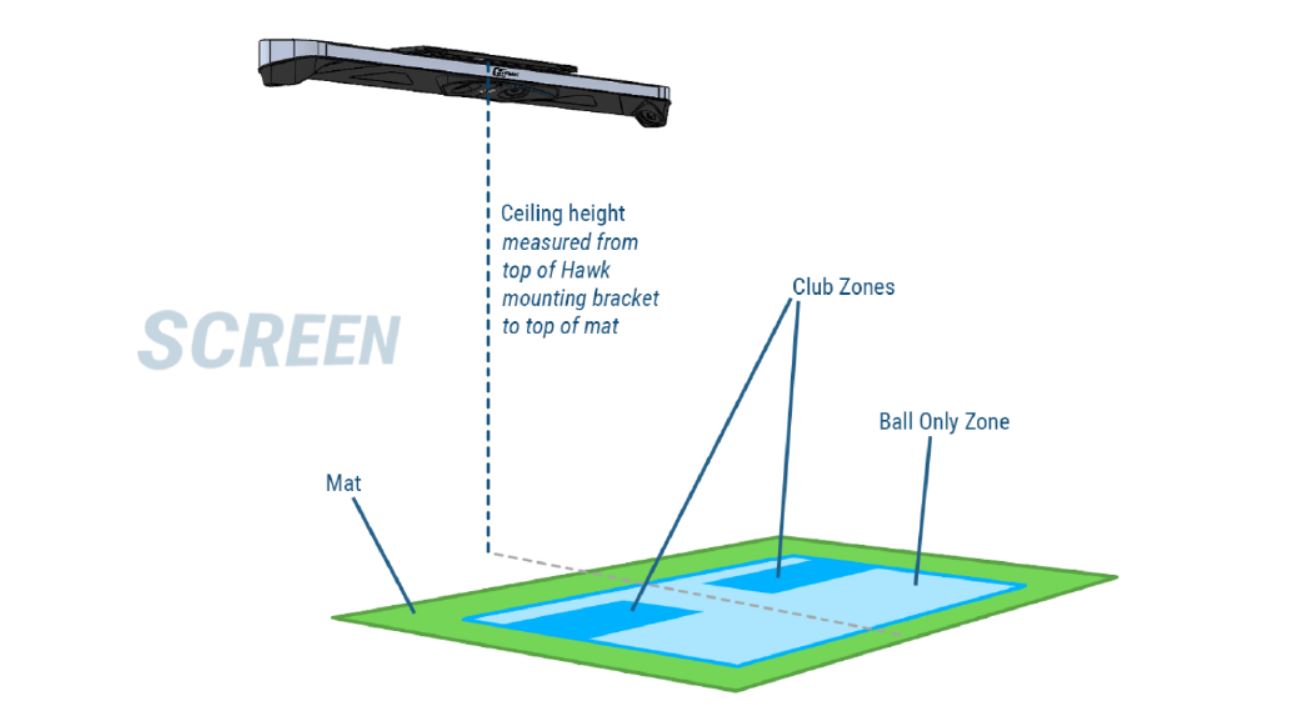
When mounted properly the Ball Only ball find zone should be large and cover your Hitting Zone on your mat correctly.
When in Ball & Club Mode, the ball find zone is smaller and located in the Front Left and Right handed side of your hitting zone as shown above.
If you have continued issues please be sure to review the other trouble shooting guides that appear relevant to the issue you are encountering.
Related Articles
Understanding Ball and Club Data Guide
Please see the guide below to better understand the Ball and Club data metrics provided to you with your Foresight Sports Product: Understanding Ball & Club DataGCHawk (GCH) - Recalibration
Our GCHawk (GCH) launch monitor uses a series of sophisticated cameras to capture, track, and provide data for launch golf balls and golf clubs (if club mode is purchased). This ceiling mounted device requires calibration by the user, and this device ...How to Report Incorrect or Inaccurate Data
Seeing numbers that look off, short, or just wrong? Before you report an issue, run through the quick checks below. Most “bad numbers” come down to unit settings or environment/setup; not hardware. Step 1: Verify Unit Settings Many reports of “off ...Why Is My Device Having Ball Lock Issues?
Ball Lock issues occur when your Foresight Sports launch monitor struggles to correctly identify the golf ball inside the capture zone / hitting zone. Your device must clearly see the entire circumference of the ball, with less than 1 mm of movement, ...Troubleshooting Club Data and Marker Detection on Foresight Sports Launch Monitors
If your launch monitor isn’t showing club data; or is only displaying Club Head Speed and Smash Factor; your device may not be detecting the club markers correctly or may be operating in 1-Dot Mode. This guide covers how club data is captured, what ...