Adjusting The Center Hitting Line
To proceed, locate a 20 foot tape measure and proceed with the following:
1. With your software closed, locate the search box in the bottom left hand corner of your Windows Desktop.
2. Type the word "roomconfig" into the search box. If this is not present for older software enter "simsetup"
3. As you type the word above you will see the icon for the Room Configuration Tool
4. Right-click on this icon and select RUN AS ADMINISTRATOR.
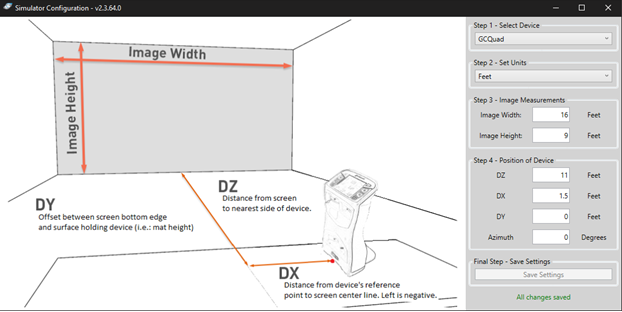
5. Be sure to follow these illustrated instructions to ensure your measurements are inputted correctly (The DY and Azimuth should be left at 0 unless otherwise needed).
- A customer who wants the line at the center will set the DX to 1.5 feet
- A customer who wants the center line to the far right will want to INCREASE the DX number.
- Please Note: this will be mirrored for a left handed player when one is selected in the Software. Be sure not to use a negative number in your DX.
However, it is BEST that the customer measures all this to ensure the aimline matches their physical setup.